Yes. If a conversation contains more than one PDF file, you can compare two PDF documents side by side using the Compare option.
To compare two PDF documents:
Right-click one of the PDF files in the conversation, or open the Media Item Menu (the blue icon on the file).
Select Compare.
Choose the second PDF document you want to compare.
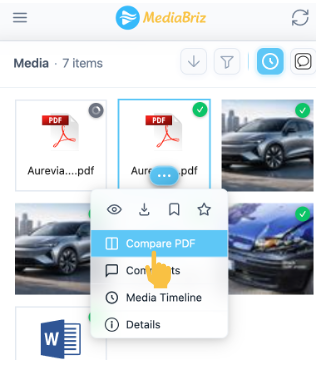
The two documents will open in a side-by-side comparison view.
In this view, you can:
Zoom in or out
Download either document
Edit the PDFs by drawing or blurring content
Please note that PDF edits are not saved in the application.
To keep any changes, you must download the edited file to your local machine.
Was this article helpful?
That’s Great!
Thank you for your feedback
Sorry! We couldn't be helpful
Thank you for your feedback
Feedback sent
We appreciate your effort and will try to fix the article